
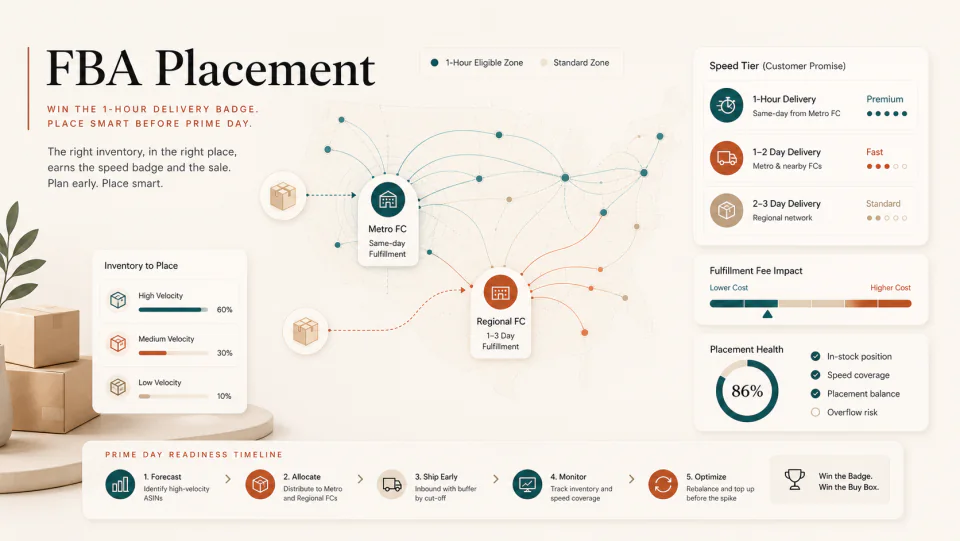
Who gets Amazon's 1-hour delivery badge? FBA placement strategy before Prime Day
90,000 products now carry the speed-tier badge. The factor that decides whether your ASIN gets in isn't category — it's which FC your inventory lives in. And there's about six weeks left to shift.
By WAYAMZ Team
Amazon rolled out a 1-hour delivery badge — but you don’t apply for it. You earn it by having the right inventory in the right warehouse.
Roughly 90,000 SKUs now carry the speed-tier label. Search-result conversion is quietly bifurcating between the products that got in and the products that didn’t. Whether your ASIN enters this pool is less about category and more about how close your FBA inventory sits to a Same-Day FC.
There are about six weeks left before Prime Day — the last meaningful window to rebalance.
What most sellers get wrong
Common dismissals:
- ❌ “My category isn’t eligible.”
- ❌ “I don’t sell consumables.”
- ❌ “This is an Amazon-private-label thing.”
The reality: Amazon’s 1-hour / 3-hour delivery runs on the existing Same-Day FC infrastructure. If you meet three conditions, you drop into the speed pool automatically:
- ✅ FBA seller
- ✅ Inventory physically in a Same-Day FC
- ✅ Eligible category (the category list is expanding)
There’s nothing to apply for. There’s inventory to rebalance.
The warehouse logic behind the badge
Amazon’s fulfillment network now has tiered economics:
Inventory near a Metro Same-Day FC
- Lowest fulfillment fee (up to 35% reduction)
- Automatically eligible for the speed badge
Inventory stuck in regional mega-FCs
- Higher fulfillment fee
- Never enters the speed pool
The layer your inventory falls into is decided by Amazon’s AI placement algorithm — but you can push on it:
FBA settings → enable Optimize Placement
That flag tells Amazon to distribute your inbound inventory across Metro FCs. FBM sellers don’t get this option at all.
Three steps to run tonight
1. Pull a Fulfillment Report. Seller Central → Inventory → FBA Inventory → export FC distribution. Look at where your hero ASINs actually live.
2. Turn on Optimize Placement. Seller Central → Settings → FBA → Inventory Placement Settings → select Optimized Distribution.
3. Check category eligibility against your competitors.
Visit amazon.com/getitfast, search your core keywords, check which competitors now carry the speed badge. If they have it and you don’t, your placement strategy needs to move.
Why it matters for Prime Day
The speed pool is one of the least-discussed conversion levers for this year’s Prime Day. Fewer sellers know about it, fewer still are acting on it. Ten minutes inspecting FC distribution tonight can show up as a very different search-result story in six weeks.
The Operator Brief
One email a week, operator's cut.
The week's sharpest Amazon signals from the journal — policy changes, fee math, and the data reads worth acting on. No spam, unsubscribe anytime.