
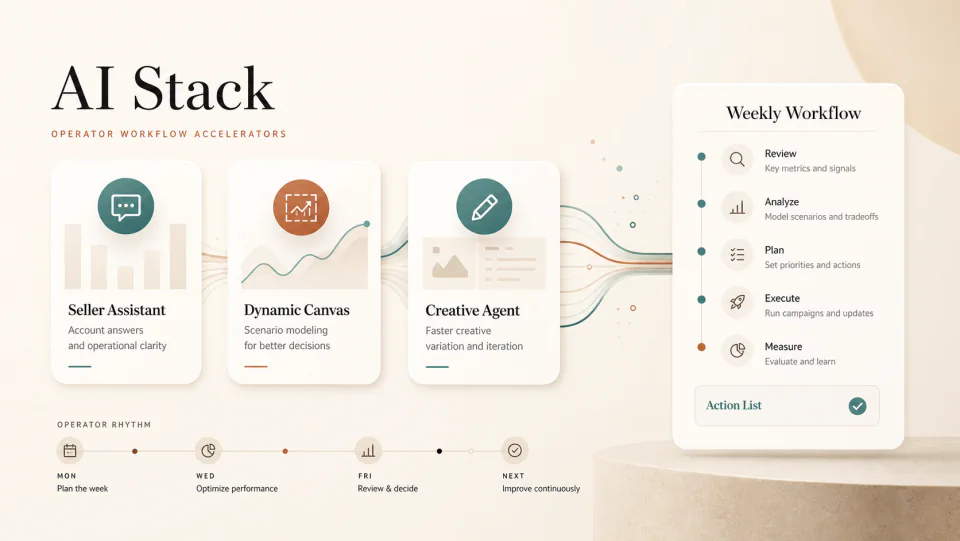
Three free Amazon AI tools sellers should put into the weekly workflow
Seller Assistant, Dynamic Canvas, and Creative Agent are becoming useful first-party AI surfaces. They will not replace operators, but they can compress research, simulation, and creative iteration.
By WAYAMZ Team
Amazon’s own AI tools are no longer just press-release features.
For many sellers, the first instinct is still to open a third-party tool, export data, paste it into ChatGPT, and ask for a recommendation. That can work, but it misses the bigger shift: Amazon is putting AI surfaces directly inside the operating environment.
That matters because first-party tools can sit closer to the actual account context. They still need operator review. They still make mistakes. But they can shorten the path between question, data, and action.
The three tools worth watching are Seller Assistant, Dynamic Canvas, and Creative Agent.
Seller Assistant: The Account Question Layer
Seller Assistant is useful when the operator needs a faster way to ask account-level questions.
Think of it as a navigation and interpretation layer, not a final decision maker. It can help summarize where to find a setting, explain policy language, or point the team toward the next operational step. The risk is treating that answer as complete without checking the actual account state.
Use it for questions like:
- Which report should we pull for this issue?
- What policy area applies to this listing change?
- What account-health signal should we review first?
- Which operational task is blocking the next action?
The output should become a checklist, not an order.
Dynamic Canvas: The Scenario Layer
Dynamic Canvas is more interesting because it moves beyond chat.
A visual scenario workspace can help sellers model inventory, advertising, sales, and what-if decisions without building a fresh spreadsheet every time. The value is speed. A team can ask what happens if demand softens, budget moves, or replenishment arrives late, then use the visual output to frame the decision.
This does not replace forecasting. It improves the quality of the first conversation.
For example, a Monday review can start with three scenarios:
- What happens if the hero SKU sells 15 percent slower than plan?
- Which campaign group should get incremental budget if conversion holds?
- Which ASIN creates the highest stockout risk if inbound inventory slips by a week?
The operator then checks the assumptions before acting.
Creative Agent: The Iteration Layer
Creative Agent belongs in the creative testing workflow, not in brand strategy.
AI can produce more versions of an ad concept, headline direction, product-use angle, or visual idea. That is useful. It is also dangerous if the team accepts generic creative because it looks polished.
The right role is variation generation. Use it to explore angles, then filter those angles against brand voice, Amazon policy, product truth, and campaign structure.
Good operators still ask: what buyer objection does this creative answer? Which audience is it for? What test will prove whether it works?
How To Combine The Three
The weekly workflow can be simple:
Use Seller Assistant to clarify the account or policy question. Use Dynamic Canvas to model the business decision. Use Creative Agent to create the test assets when the decision requires creative variation.
Then end with a human-owned action list.
That final step is the difference between AI activity and operator leverage.
What To Keep Outside The AI Layer
Do not let the tools own brand judgment, compliance judgment, or final budget decisions.
AI can summarize options quickly, but it does not know the supplier relationship, the margin promise made to finance, the positioning line the brand cannot cross, or the customer expectation that shows up in support tickets. Those constraints need to be written into the workflow.
The strongest teams will build short operating prompts around their own rules: minimum margin, restricted claims, hero SKU priorities, inventory risk, and brand language. Without those constraints, the tools may produce work that is fast but generic.
Treat the first-party AI layer as a force multiplier for a good process. If the process is loose, AI will mostly make the looseness faster.
The Operator Read
Amazon’s AI tools will not remove the need for judgment. They may remove a lot of the slow middle work: finding reports, building first-pass scenarios, and drafting test variants.
For agencies and in-house teams, the advantage will come from rhythm. The sellers who win will not be the ones who click every AI button. They will be the ones who know which question each tool should answer.
Use first-party AI where it compresses the workflow. Keep humans in charge of the decision.
The Operator Brief
One email a week, operator's cut.
The week's sharpest Amazon signals from the journal — policy changes, fee math, and the data reads worth acting on. No spam, unsubscribe anytime.